Understanding Network and Switch Ports on Nodegrid Devices
Understanding Network and Switch Ports on Nodegrid Devices
Depending on the device type (Gate SR, Net SR, Bold SR, etc.), the available network and switch ports may vary. This document explains how these ports work and how to use them based on the device type. Since the BSR and GSR operate nearly the same way as the NSR, if you are seeking for knowledge for them please take a look on the Net SR Standard explanation first.
This guide focuses on devices that include both Network Ports and Switch Ports, excluding models such as Link SR, Mini SR, and NSCP. These excluded devices only h ave network/management ports that operate in a routed manner, making them simpler to configure.
Network vs. Switch Ports
Typically, the network ports (ETH, SFP, CELLULAR) displayed under Network :: Connections are not in the same Layer 2 domain as the switch ports (or between themselves). This distinction introduces certain requirements depending on your implementation, so understanding this separation is critical for proper configuration. The Network :: Connections ports can be configured to have an IP address (and VLAN also) but the switch ports are restricted to the Layer 2 domain and cannot be managed this way.
Backplane Interfaces
To bridge this gap, most devices include backplane interfaces, which internally connect the Nodegrid system to its integrated Marvell switch. These backplane interfaces allow:
- Management access to devices connected to the switch.
- Layer 2 bridging between a network interface and the backplane, creating a unified Layer 2 domain.
Important Considerations
- The Marvell switch is not managed by Nodegrid’s Network :: Connections.
- Switch ports cannot be added to bridges or interfaces under Network :: Connections.
- Switch configuration (LAGs, VLANs, etc.) must be performed under Network :: Switch.
Devices specifications:
Net SR Standard
Under Network :: Switch :: Switch Interfaces, you can see the physical layout of Nodegrid OS interfaces and switch ports. The diagram below shows an example of an NSR device with an SFP slot (can be also an PoE or Ethernet), which becomes a switchable interface once the module is connected.
On Net SR devices, the SFP ports belong to the switch, not to the Nodegrid OS. This means:
- These SFP ports cannot be used as management interfaces and cannot have an IP address assigned directly.
- To manage the device, you must use either the ETH ports (which are part of Nodegrid OS) or Backplane interfaces (internal links between Nodegrid OS and the switch).
Here, you can see clearly that the backplane interfaces are critical because they provide connectivity between Nodegrid OS and the switch. If these backplanes are not configured, the device will have no communication with devices connected to the switch ports, since ETH0 alone does not connect to the switch. However, even without configuration on the backplanes, the switch will still works as intended and switch and forward traffic.
Since the backplanes are, at the same time, Nodegrid OS and switch interface, they can be VLAN tagged under Network :: Switch :: VLAN and be configured with other things as LAGs, ACL etc., depending on the device features.
Since the backplanes are, at the same time, Nodegrid OS and switch interface, they can be VLAN tagged under Network :: Switch :: VLAN and be configured with other things as LAGs, ACL etc., depending on the device features.
To allow, for example, your ETH0 to communicate with the switch you can either:
- Create a bridge between ETH0 and one of the backplane interfaces. This places both interfaces in the same Layer 2 domain.
- Configure internal routing on the NSR to enable communication between ETH0 and the switch network. One of the backplanes needs to have an IP Address under Network :: Connections.
Gate SR
The main difference on the Gate SR (compared to the Net SR), as it shows on the image below, is that it only have 8 Ethernet switch ports (4 with PoE) and his SFP ports are now a Nodegrid OS interface.
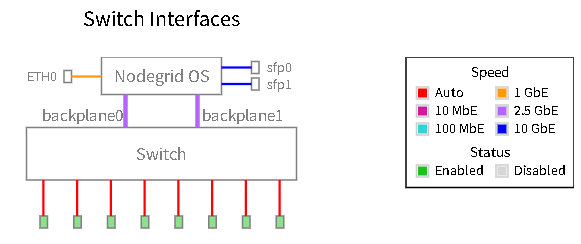
This means that the SFPs are now configurable to receive an IP and work as a uplink or management port for the device.
Bold SR
On the Bold SR, we have a way simple configuration: only one backplane and ETH (that can be manageable on the Nodegrid OS) and 4 Ethernet switch ports.
It works the same way as the Gate and Net SR's, but without the additional SFP ports and now only one backplane.
Hive SR
This device does not have an internal Marvell Switch, and will not have a Network :: Switch GUI page or configuration.
In him, you'll see only Network :: Connections interfaces:
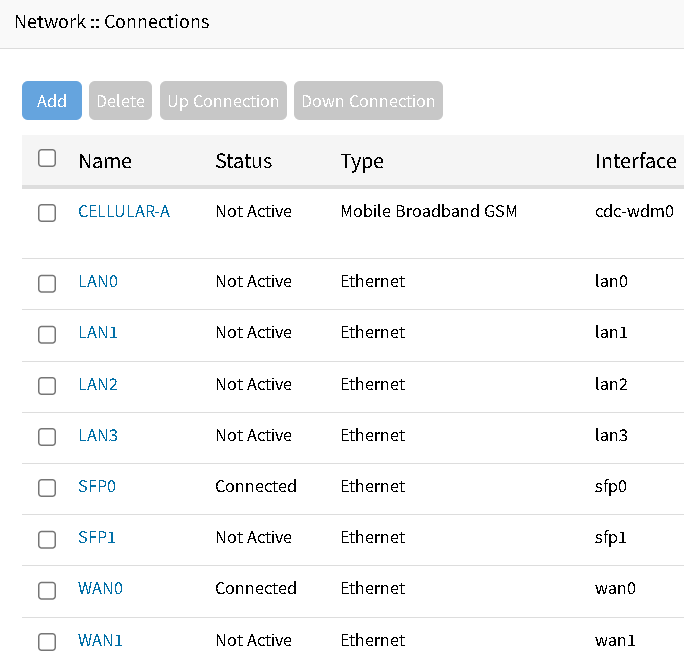
As explained earlier, on this Nodegrid OS interfaces, you can set an IP and work with VLANs as well, but they do not share the same Layer 2 network domain.
One major difference of the Hive SR is the WAN interfaces:

They can be used either as SFP or RJ45. The system will automatically understand which port is being used, but you cannot use both at the same time.
Here you have different ways to work:
In him, you'll see only Network :: Connections interfaces:
As explained earlier, on this Nodegrid OS interfaces, you can set an IP and work with VLANs as well, but they do not share the same Layer 2 network domain.
One major difference of the Hive SR is the WAN interfaces:
They can be used either as SFP or RJ45. The system will automatically understand which port is being used, but you cannot use both at the same time.
Here you have different ways to work:
- Work point-to-point, setting an IP for each interface, to communicate for a device or a network.
- Make a bridge between one interface (SFPs, WANs) and the LAN interfaces that you want. This will create a logical switch (basically what a bridge is), enabling you to communicate with the devices on the ports, with well configured. This will be similar as a normal switch or (when comparing with the other devices type) when you make a bridge between one Nodegrid OS and one backplane.