Nodegrid Routing - Routing Table, FRR, Firewall, etc.
Overview of Nodegrid Routing
Most Nodegrid features are deeply rooted in networking concepts. For this reason, this article focuses on the networking configurations available on the platform and explains how they operate internally within the device.
Many Nodegrid features and packages are not proprietary technologies; instead, they are widely adopted and well-known networking mechanisms such as routing tables, VLANs, VPNs, and firewall rules. Since Nodegrid OS is based on the Linux kernel, its packet forwarding behavior, routing logic, and traffic control closely follow standard Linux networking principles.
With this in mind, most features and configurations discussed here can also be researched externally using Linux and networking documentation, which can be helpful for deeper understanding and advanced use cases. Whenever applicable, this article will reference official Nodegrid and packages documentation to link concepts with their specific implementation on the platform.
The goal of this knowledge base is to provide a clear mental model of how networking works inside Nodegrid, starting from fundamental Linux networking concepts and gradually progressing to Nodegrid-specific services and packages.
1. Nodegrid Networking overview and Linux Fundamentals
Nodegrid devices are built on top of a Linux-based operating system, and their networking behavior is fundamentally driven by standard Linux kernel mechanisms. Understanding how networking works inside Nodegrid therefore requires first understanding how Linux handles interfaces, packet flow, and forwarding decisions, and then mapping those concepts to the abstractions exposed by the Nodegrid platform.
At a high level, Nodegrid combines three main layers:
1 The Linux kernel networking stack, which is responsible for packet processing, routing decisions, firewalling, and forwarding.
2 The Nodegrid OS services, which configure and manage Linux networking components in a structured and consistent way.
3 The management interfaces (Web UI, CLI, API), which abstract Linux primitives into user-friendly objects such as interfaces, routes, firewalls, and VPNs.
The Linux shell can be accessed by goin to the console and typing: shell sudo su -
Nodegrid to Linux interfaces
Each physical or virtual network port configured in Nodegrid corresponds directly to a Linux network interface. Whether the interface is a physical Ethernet port, a VLAN subinterface, or a virtual tunnel interface, it exists as a standard Linux network device in the system.
Nodegrid abstracts the creation and management of these interfaces through its configuration layers, but the resulting behavior is deterministic and verifiable from the Linux perspective. Interface states, MTU, VLAN tags, and IP addressing are all applied using standard kernel mechanisms.
This tight coupling between Nodegrid objects and Linux interfaces is what allows advanced scenarios, such as:
Multiple interfaces participating in different routing domains;
VLAN-tagged traffic sharing physical ports;
VPN tunnels acting as first-class routing interfaces.
Packet Flow
When a packet enters a Nodegrid device, it follows the standard Linux packet processing pipeline:
1. The packet is received on a specific network interface;
2. The kernel determines whether the packet is destined for the local system or must be forwarded;
3. Routing tables and policy rules are consulted to select the next hop;
4. Firewall rules are evaluated;
5. NAT rules may alter the packet’s source or destination;
6. The packet is transmitted through the selected egress interface, or delivered locally.
Nodegrid does not bypass or replace this logic. Instead, it provides a controlled way of configuring each step of the pipeline using familiar networking concepts.
Source IP Selection when a packet leaves the nodegrid
When a packet is sent or forwarded by Nodegrid, the source IP address used is not chosen arbitrarily, nor is it always the IP address from the egress interface.
- If a packet is forwarded, the source and destination IP does not change;
- If the packet is locally generated (ping, SHH, etc.), the kernel uses the IP of the egress interface, unless you have an connected route giving you an source.
2. Routing Tables
You can access the Routing Table of the device through the UI/CLI or over the shell:
UI: Tracking :: Network :: Routing Table
CLI: /system/routing_table/
Shell: ip route
Routing tables define how a system decides where to send a packet after it is received on a network interface. In Nodegrid, routing decisions are performed entirely by the Linux kernel, using standard Linux routing tables and policy routing mechanisms.
You can have more then one routing table, that have their IP's assigned by rules that send the packet to the right table.
Multiple Routing Table
On the default configuration, nodegrid works with multiple routing tables:
This gives to the device one table for each interface, outside the default tables (local, main, default).
Each table is ruled by one ip rule, for example:
root@nodegrid:~# ip rule
0: from all lookup local
32763: from 10.69.13.117 lookup wwan0
32764: from 10.10.10.3 lookup sfp0
32765: from 192.168.45.5 lookup eth0
32766: from all lookup main
32767: from all lookup default
Whenever a packet is going out with source 10.10.10.3, is going to use the sfp0 table. Inside the sfp0, we have:
root@nodegrid:~# ip route show table sfp0
default via 10.10.10.1 dev sfp0
10.10.10.0/24 dev sfp0 scope link src 10.10.10.3
10.10.10.0/24 dev sfp0 scope link metric 100
10.10.10.3 dev sfp0 scope link
Default tables:
local: local traffic from the system. Loopback and Interface /32 IP's are here, to local use of the system.
main: most of the configured routes reside here (connected, static, DHCP, defaults, etc.). If any of the other rules match (for wwan0, sfp0, eth0, local), it will use the main.
default: it's rarely used and in most of the times is blank. It's the last fallback and is not common to be used.
Interface tables:
The interface tables depends on your environment, but all of them depends on the source IP of the packet. These routing tables, on the case of the nodegrid, are created to make sure answers to packets egress from the interface that they ingresses, enforcing interface and packet symmetry.
Incoming packets are delivered locally via the local table and do not select a routing table. When the system generates responses or originates traffic with a specific local source address, ip rule ensures that the corresponding per-interface routing table is used. Forwarded traffic is unaffected and can be routed between interfaces normally, according to standard routing and firewall rules.
Incoming packets are delivered locally via the local table and do not select a routing table. When the system generates responses or originates traffic with a specific local source address, ip rule ensures that the corresponding per-interface routing table is used. Forwarded traffic is unaffected and can be routed between interfaces normally, according to standard routing and firewall rules.
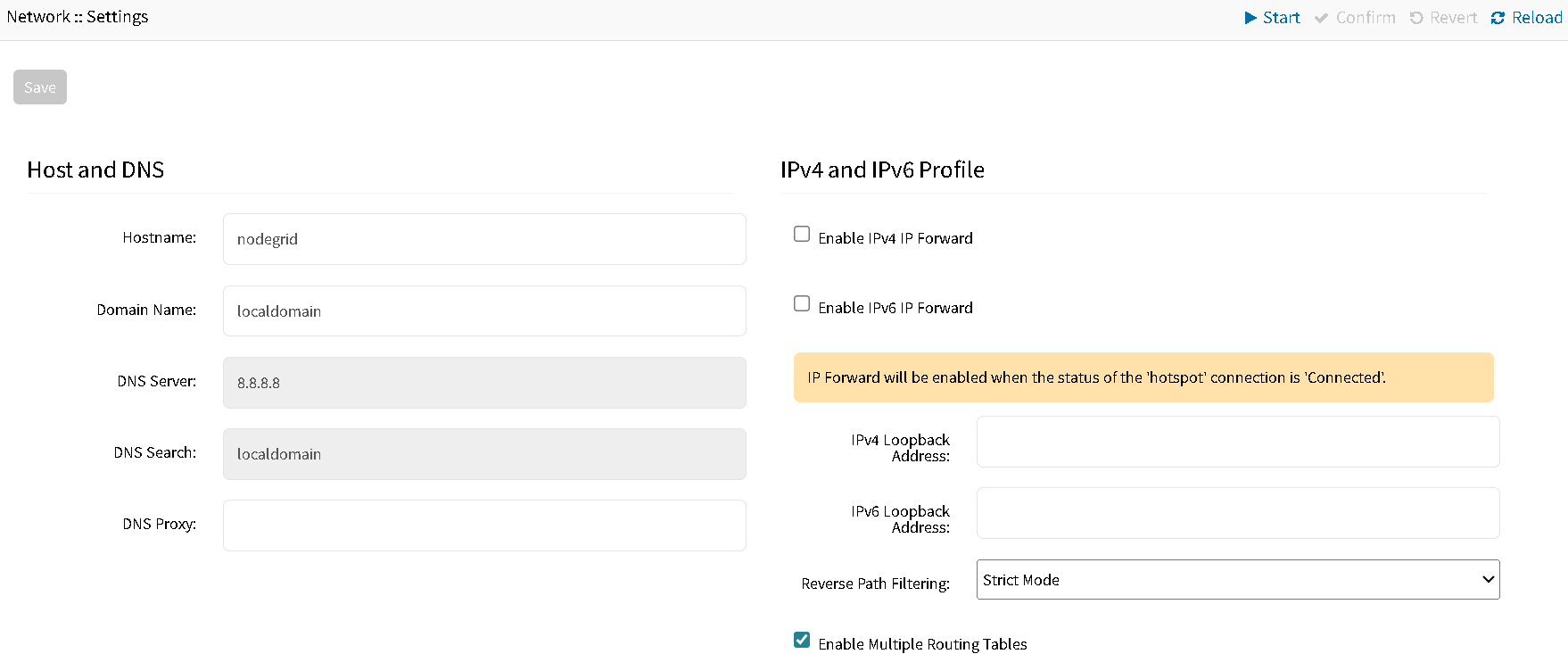
This tables can de disabled by going to Network :: Settings and unchecking "Multiple Routing Table".
Reverse Path Filtering
Reverse Path Filtering is a Linux kernel mechanism used to validate that incoming packets are received on the correct interface, based on the routing table.
When enabled, the kernel checks whether the best return path to the packet's source IP address matches the interface where the packet was received.
When a packet arrives:
The kernel looks up the source IP in the routing table;
It determines which interface would be used to reach that source;
If the expected interface does not match the ingress interface, the packet may be dropped.
It operates in three modes:
Mode | Behavior |
0 | Disabled |
1 | Strict Mode - Exact Match |
| 2 | Loose Mode - Source must me reachable, but interface mismatch is allowed |
This can be configured under Network :: Settings on Nodegrid.
How Linux Chooses the Route
When a packet arrives at Nodegrid, Linux follows this logic:
1. Look for the most specific matching route;
2. If multiple routes match, choose the one with:
Longest prefix (/16,/24, etc.)
Lowest metric (90, 100, 120, etc.)
And determine:
Egress interface.
Next-hop gateway (if required).
The metric 90 is reserved for the default route from the interface configured as primary interface (we'll explain later).
Connected Routes (Automatically Created)
These are automatically created when an interface is assigned an IP address:
10.10.10.0/24 dev sfp0 proto kernel scope link src 10.10.10.1 metric 100
This means that this subnet is directly connected and reachable by this interface. Any packet destinated to 10.10.10.0/24 will exit via sfp0.
This means that this subnet is directly connected and reachable by this interface. Any packet destinated to 10.10.10.0/24 will exit via sfp0.
Static Routes
When creating an static route over the UI or CLI, you'll see an new route on the routing table of the device:
20.20.20.0/24 via 192.168.45.5 dev eth0 table eth0 metric 100
This route created will also be placed on the individual table for the interface, if the Multiple Routing Table is enabled.
A static route defines an explicit path for reaching a remote network through a specific gateway and outgoing interface. In Nodegrid, static routes are translated directly into Linux kernel routing entries and participate in the standard routing decision process.
This route instructs the system that any traffic destined for the network 20.20.20.0/24 must be forwarded to the next-hop gateway 192.168.45.5 using the interface eth0.

Note: the static route created on the UI will only be active If the gateway does belong to a network directly connected to that interface.
Default Routes
default via 192.168.45.254 dev eth0 proto dhcp metric 90
default via 10.10.10.1 dev sfp0 proto static metric 100
default via 10.10.10.1 dev sfp0 proto static metric 100
These are default routes, used when no more specific route exists. Linux will select the one with the lowest metric to send the traffic that no other more specific route matches.
3. Network Interfaces
Under Network :: Connections, you can create new interfaces or assign IP to the ones that are already created.
You can either create the interface with or without gateway, and this will be reflected on the routes that are automatically created for it. See the example below with the backplane0 and backplane1:
root@nodegrid:~# ip route
default via 10.10.10.1 dev backplane0 proto static metric 100
10.10.10.0/24 dev backplane0 proto kernel scope link src 10.10.10.2 metric 100
11.11.11.0/24 dev backplane1 proto kernel scope link src 11.11.11.2 metric 100
Since backplane1 didn't have an gateway configured, it also does not have an default route for it.
The interface marked as "Primary Connection" will always have his metric as 90 on the routes:
default via 192.168.45.254 dev eth0 proto dhcp metric 90
This is to ensure that, if any of the other routes matches, this is the one that will be used to the traffic.
Since backplane1 didn't have an gateway configured, it also does not have an default route for it.
The interface marked as "Primary Connection" will always have his metric as 90 on the routes:
default via 192.168.45.254 dev eth0 proto dhcp metric 90
This is to ensure that, if any of the other routes matches, this is the one that will be used to the traffic.
4. Firewall and NAT
Nodegrid implements firewalling and network address translation using the Linux iptables framework. Rather than introducing a proprietary packet‑processing engine, Nodegrid configures standard Linux hooks, tables, and chains, while exposing them through a controlled management interface.
Packet Processing
- Packet reception
- Routing decision
- Firewall evaluation
- Optional NAT processing
- Packet delivery (local or forwarded)
Firewall and NAT do not decide routing. Instead, they operate around routing decisions, either before or after the kernel selects an egress interface.
Firewall Fundamentals
The firewall in Nodegrid is based on the filter table of iptables. This table determines whether packets are accepted, dropped, or rejected.
Chain | Purpose | Notes |
INPUT | Traffic destined to the Nodegrid. Ingressing an interface. | Routing has already determined. Only allows or not the packet. |
OUTPUT | Traffic generated by the Nodegrid. Egressing an interface. | The packet is not destined for Nodegrid. Inter-network security. |
FORWARD | Traffic passing through the Nodegrid. Routed through interfaces. | Source address and egress interface selection has already occurred. |
The rules to accept or drop the packets can also be stateful, with this states:
NEW
ESTABLISHED
RELATED
INVALID
NAT Fundamentals
Network Address Translation modifies packet headers to allow traffic to cross address boundaries.
Chain | When | Function |
PREROUTING | Before routing. Incoming packets. | DNAT |
OUTPUT | Before routing. Local packets. | DNAT for local services |
POSTROUTING | After routing | SNAT/MASQUERADE |
DNAT - Destination NAT:
Changes the destination IP or port of a packet before routing. Normally used to port forwarding or exposing internal services. DNAT happens before the routing decision, so the kernel routes the packet as if the rewritten destination was the original target.
SNAT / MASQUERADE:
They rewrite the source address after the routing process. Routing chooses where the packet will go and NAT only changes how it looks.
They rewrite the source address after the routing process. Routing chooses where the packet will go and NAT only changes how it looks.
Example:
Source‑based routing selects table eth0;
Routing chooses eth0 as egress;
POSTROUTING SNAT rewrites the source if configured.
5. VPNs and Routing Behavior (WireGuard & IPsec)
There are two fundamental VPN models in Linux (and Nodegrid):
| Model | Behavior | Interface | Routing |
|---|---|---|---|
| Route-based | Tunnel is a network interface | Yes | Uses routing table |
| Policy-based | No interface | No | Uses IPsec policies (xfrm) |
WireGuard
WireGuard will always create a virtual interface (wg0), that will behave as a normal linux interface. Because of that, WireGuard is an Route-based VPN.
This interface will work as entry/exit point for encrypted traffic. Traffic is:
1. Routed to wg0;
2. Encrypted;
3. Sent to peer endpoint.
WireGuard uses the AllowedIPs parameter to define which traffic should be routed through the tunnel.
Example:
AllowedIPs = 10.20.20.0/24
This results in the equivalent kernel routing entry (that WireGuard will add):
10.20.20.0/24 dev wg0
This means that any traffic destined for that network is routed through the WireGuard interface and is encrypted.
IPsec (Libreswan)
Policy-Based IPsec
This is the default behavior when no Virtual Tunnel Interface (VTI) is used.
Traffic is controlled through kernel IPsec policies (xfrm subsystem)
Traffic is identified using subnet definitions:
Left Subnet: 10.10.10.0/24
Right Subnet: 20.20.20.0/24
With that, kernel creates rules such as:
Source 10.10.10.0/24 AND Destination 20.20.20.0/24 → Encrypt
Before the packet is transmitted, the kernel intercepts it and applies IPsec encryption based on the policy.
Route-Based IPsec (VTI)
When the Virtual Tunnel Interface (VTI) option is enabled, IPsec behaves as a route-based VPN, creating an standard routed interface.
With an configuration like this:
Local Address: 10.10.10.1/30 (Left Address)
Remote Address: 10.10.10.2/30 (Right Address)
This creates a point-to-point logical tunnel between both endpoints. 10.10.10.1/30 would be the VTI IP Address.
The kernel applies IPsec encryption to traffic exiting the interface.
When the option "Automatically create VTI routes" is enabled, routes are installed such as:
20.20.20.0/24 dev vti1
This is based on the networks added as "Subnets" on the Right side.
This ensures that traffic destined for the remote network is sent through the tunnel.
6. Routing Protocols (BGP and OSPF)
Routing protocols are responsible for dynamically learning, selecting, and installing routes into the Linux routing table. In Nodegrid, these protocols are implemented by FRR and operate on top of the Linux kernel routing system.
Although BGP and OSPF use their own logic to select the “best path”, the final forwarding decision is always performed by the Linux kernel after routes are installed.
Routing protocols calculate the best path internally and then install routes into the kernel routing table.
Example:
20.20.20.0/24 via 10.10.10.2 dev eth0 proto bgp metric 20
From this point forward:
The route behaves like any other route (static or connected);
The kernel is responsible for forwarding packets;
Routing protocol decisions no longer participate in packet forwarding.
The kernel does not consider AS_PATH, OSPF cost or BGP attributes to select the routes.
Route Preference and Priority (Critical Concept)
Different route types have implicit priorities in Linux. Typical order of preference:
Connected routes (highest priority);
Static routes;
Dynamic routes (BGP, OSPF).
Example:
10.10.10.0/24 dev eth0 proto kernel
10.10.10.0/24 via 10.10.10.2 proto bgp
The kernel will always prefer the connected route, regardless of BGP attributes.
Connected routes are automatically created when an interface has an IP address:
10.10.10.0/24 dev eth0 proto kernel scope link
These routes have very high priority and affect routing protocol behavior:
In OSPF:
Connected routes are advertised automatically (depending on configuration)
OSPF uses interface cost to calculate path selection
If a network is directly connected, OSPF prefers it over learned routes
In BGP:
Connected routes can be redistributed into BGP
Local routes often have higher preference (LOCAL_PREF)
Even if BGP advertises an alternative path, the kernel may still prefer the connected route
Protocol Metrics:
OSPF: cost (based on bandwidth).
BGP: attributes (AS_PATH, LOCAL_PREF, MED).
These are used only to decide which route will be installed in the kernel.
If two routes have the same prefix length, the kernel selects the one with the lowest metric.
OSPF Route Selection Behavior
OSPF uses the Shortest Path First algorithm.
Selection is based on:
Sum of interface costs along the path
Example:
Path A cost: 10
Path B cost: 20
OSPF selects Path A and installs it in the kernel.
Once installed:
The kernel uses it like any other route
Only kernel metric matters if multiple equal routes exist
BGP Route Selection Behavior
BGP uses a multi-step decision process:
Highest LOCAL_PREF
Shortest AS_PATH
Lowest MED
eBGP over iBGP
Lowest IGP cost to next hop
After the decision:
Only the best path is installed in the routing table (by default)
Interaction with VPN Interfaces
Routing protocols can run over:
WireGuard interfaces (wg0)
VTI interfaces (vti1)
In these cases:
The tunnel interface appears as a normal interface
OSPF and BGP treat it like any other link
Tunnel IPs are used as next-hop