How to perform Multiple Software Upgrades on the Nodegrid OS, using the Clustering
This article deals with the software upgrade of multiple Nodegrid units, that are peer members of a Cluster.
Reminder about the Cluster, the Coordinator and the Peers [Extract of User Guide, v5.4, p 341]:
Enable Cluster:
When enabled, each Cluster requires one Coordinator that controls enrollment of peer systems. The first unit in the Cluster must be the Coordinator. All other units are Peers. When a Peer device is set to the Coordinator role, the change is automatically propagated. The previous Coordinator device is changed to Peer. Ensure the Coordinator device has Allow Enrollment selected. This provides a Cluster Name and Pre-Shared Key to enroll peers (and used in each Peer's settings). The Cluster Mode can be Star or Mesh.
Enable Cluster:
When enabled, each Cluster requires one Coordinator that controls enrollment of peer systems. The first unit in the Cluster must be the Coordinator. All other units are Peers. When a Peer device is set to the Coordinator role, the change is automatically propagated. The previous Coordinator device is changed to Peer. Ensure the Coordinator device has Allow Enrollment selected. This provides a Cluster Name and Pre-Shared Key to enroll peers (and used in each Peer's settings). The Cluster Mode can be Star or Mesh.
Let's proceed to the software upgrade of these peers. In my example, I use a cluster in mesh mode.
I-Using the WebUI
Pre-requisites/initial conditions:
a- Make sure that the coordinator and the peers have valid Clustering licenses.
b- The Nodegrids, coordinator and peers must belong to the same cluster. They must appear with a status On-line, in Cluster -> Peers:
c-On the Coordinator: enable the access for reading files from the datastore folder. For that, please apply the following KB article, Enable Apache for firmware/config download for /var/firefox/datastore, Link: https://support.zpesystems.com/support/zpesystemsinc/ShowHomePage.do?articlestatus=latest&rootcategoryId=152378000000067123&categoryId=152378000007869024#Solutions/dv/152378000017546001/en
Note: following this article, you will also enable HTTP access and Disable the Redirect HTTP to HTTPS.
Procedure:
1. On the Coordinator, using the File Manager, upload the iso of the release, in its /Home/datastore:
2. On the Coordinator, go to Cluster -> Management, and select the peers you want to upgrade. Click on 'Software Upgrade'.
3. The window Cluster::Management opens; change the values of the following fields:
- URL: Enter http://<NODEGRID_IP>/datastore/<RELEASE_NODEGRID_OS>.iso
- No username nor password (unless you want to use HTTPS instead of HTTP).
- Leave unclicked "The path in url to be used as absolute path name".
Click on "SW Upgrade".
Hint: before finishing step#3, verify the URL is actually reachable, by entering it into your web browser:
http://<NODEGRID_IP>/datastore/<RELEASE_NODEGRID_OS>.iso ; the download of the iso should then start correctly.
4. Go back to Cluster -> Management,
The peer line's Management Status has moved to 'SW UPGR- Download Started'
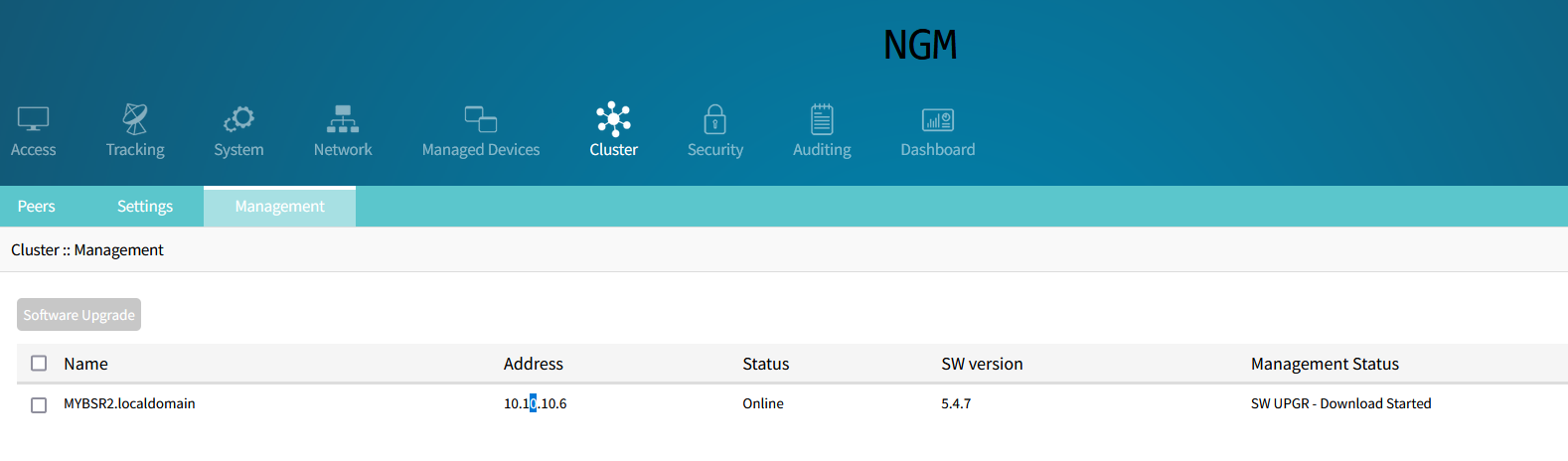
And later to 'SW-UPGR Install Started':
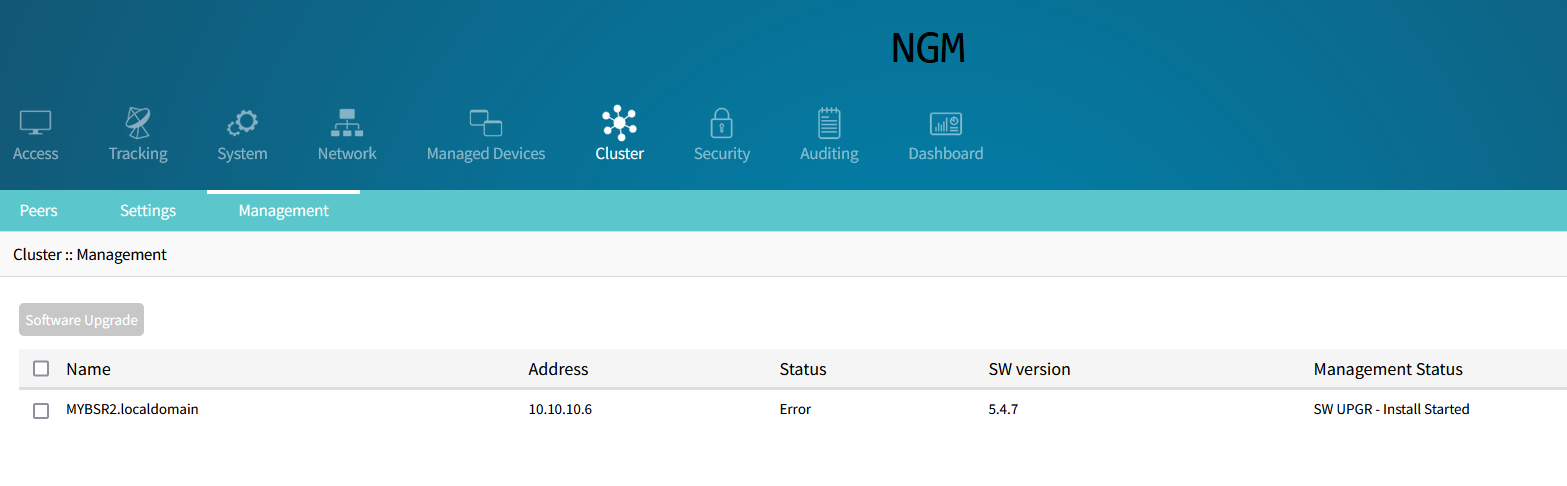
5-Then it completes the Software Upgrade, and the new software version appears in Cluster -> Management.
And later to 'SW-UPGR Install Started':
5-Then it completes the Software Upgrade, and the new software version appears in Cluster -> Management.
II-Using the CLI
Apply the same instructions as in section I, simply taking into account the following instructions:
Pre-requisites:
a-To check the licenses:
show /settings/license
b-To check that the coordinator and peers have the correct status in the cluster:
show /system/cluster_peers/
c-To enable the access to datastore folder, the http access, and to disable the redirection from http to https:
set /settings/services enable_https_file_repository=yes
set /settings/services enable_http_access=yes
set /settings/services redirect_http_to_https=no
Procedure:
1-To load the iso to the datastore of the coordinator:
Use your usual scp or sftp client, and deposit it on: /var/firefox/datastore
2-On the Coordinator, to select the peers of the cluster, and trigger the Software Upgrade, run:
[admin@NGM /]# cd settings/cluster/cluster_management
[admin@NGM cluster_management]# ls
1/
[admin@NGM cluster_management]# software_upgrade 1,
a-To check the licenses:
show /settings/license
b-To check that the coordinator and peers have the correct status in the cluster:
show /system/cluster_peers/
c-To enable the access to datastore folder, the http access, and to disable the redirection from http to https:
set /settings/services enable_https_file_repository=yes
set /settings/services enable_http_access=yes
set /settings/services redirect_http_to_https=no
Procedure:
1-To load the iso to the datastore of the coordinator:
Use your usual scp or sftp client, and deposit it on: /var/firefox/datastore
2-On the Coordinator, to select the peers of the cluster, and trigger the Software Upgrade, run:
[admin@NGM /]# cd settings/cluster/cluster_management
[admin@NGM cluster_management]# ls
1/
[admin@NGM cluster_management]# software_upgrade 1,
(where 1,... correspond to the peers listed with the previously entered command ls).
[admin@NGM {cluster_management}]# set url=http://10.10.10.11/datastore/Nodegrid_Platform_v5.4.9_20220526.iso
[admin@NGM {cluster_management}]# commit
4- Then, you will see the Management Status of the peer, with:
[admin@NGM /]# show /settings/cluster/cluster_management/
name status address sw version management status
================== ====== ========== ========== =========================
MYBSR2.localdomain Error 10.10.10.6 5.4.9 SW UPGR - Install Started
5-And once the Software Upgrade is complete, check the SW version of the peer, with the same command:
[admin@NGM cluster_management]# show /settings/cluster/cluster_management/
name status address sw version management status
================== ====== ========== ========== =================
MYBSR2.localdomain Online 10.10.10.6 5.4.9 Idle